Tag: review

  • Theme Checklist Helps Prepare Developers To Submit A Theme To The WordPress Theme Directory

    Theme Checklist Helps Prepare Developers To Submit A Theme To The WordPress Theme Directory

    Theme Checklist is a new plugin by Greg Priday of SiteOrigin. The plugin provides a checklist of items to go through before submitting a theme to the WordPress theme directory. Once activated, you’ll find the checklist under Tools > Theme Checklist. Theme developers check off each item that successfully passes a test. Themes need to…
  • How To Change The Default View Of The WordPress Media Library Uploader

    How To Change The Default View Of The WordPress Media Library Uploader

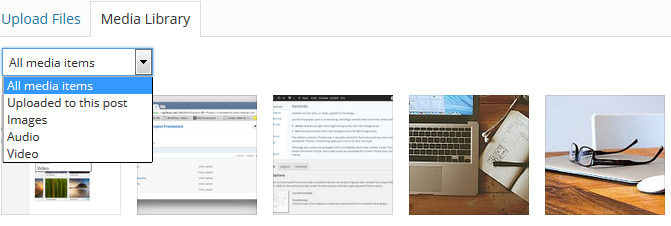
    When adding or editing images in the WordPress media library, there is a drop down menu that allows you to filter between all media items, only the items uploaded to the post, images, audio, and video. By default, the media library shows all media items. If you find yourself constantly having to switch from all…

  • New Plugin Lets You Search Media By Title, Caption, and Alt Text

    New Plugin Lets You Search Media By Title, Caption, and Alt Text

    When you search for an item in the WordPress media library, the only fields used to determine a match are the Title and Description fields. If you have hundreds of images and media files with vague file names or blank fields, it’s nearly impossible to find an image. Media Search Enhanced is a new plugin…

  • Keep Track Of Changes To Your WordPress Site With The WP SMS Notifications Plugin

    Keep Track Of Changes To Your WordPress Site With The WP SMS Notifications Plugin

    While there are plenty of plugins that help monitor changes to a site such as Stream, maybe you want a text message when specific events happen within WordPress. A brand new plugin called WP SMS Notifications, developed by Jeff Matson, fulfills this role. The plugin supports both International and US carriers without the need to…

  • Two WordPress Plugins That Enable Anonymous Previews Of Draft Posts

    Two WordPress Plugins That Enable Anonymous Previews Of Draft Posts

    Have you ever run into a situation where you need someone to preview a post but don’t want to give them access to your site? Despite the WordPress plugin directory containing over 31K plugins, there are few that offer this type of functionality. WordPress doesn’t have this ability out of the box but there are…

  • How To Easily Add Platform Agnostic Favicons To Your WordPress Site

    How To Easily Add Platform Agnostic Favicons To Your WordPress Site

    When we wrote how to create a platform agnostic favicon with RealFaviconGenerator, one of the common complaints in the comments was that you needed to add the generated HTML into the HEAD section of the theme in use. This was not ideal since switching themes would cause the favicon images to be lost. Another suggestion…

  • Create A Custom WordPress Admin Experience With Adminimize

    Create A Custom WordPress Admin Experience With Adminimize

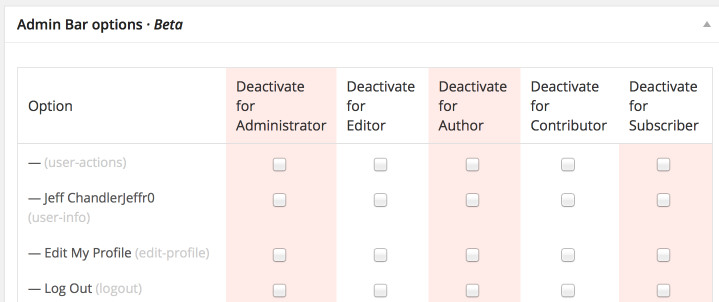
    Over the years, WordPress has added features, menus, and options throughout the backend. I’m constantly reminded of the 80/20 rule of software development where 20% of the software is not used. I’ve noticed I rarely visit some of the links and menus in the backend of WordPress but there is no easy way to remove…

  • Read Where You Write In WordPress With The Orbital Feed Reader Plugin

    Read Where You Write In WordPress With The Orbital Feed Reader Plugin

    When Google Reader was shut down on July 2nd, 2013, those who use RSS searched far and wide for suitable replacements. I’ve settled on using Feedly for my needs. However, there is a plugin available that adds an RSS reader to WordPress so you can create blog posts as you read RSS feeds from within…

  • Display Before and After Images In WordPress With The TwentyTwenty Plugin

    Display Before and After Images In WordPress With The TwentyTwenty Plugin

    Have you ever wanted to combine two images to show a before and after? You can’t do that with WordPress out of the box but it’s possible if you use the TwentyTwenty plugin by Corey Martin. The plugin takes advantage of the clip property within CSS by stacking two identical sized images on top of…

  • Which Method Do You Primarily Use To Add Items To The WordPress Media Library?

    Which Method Do You Primarily Use To Add Items To The WordPress Media Library?

    If drag and drop is your preferred method to add content to the WordPress media library and you’d like to extend that functionality to the featured images meta box, you’re in luck. Developed by Jonathan Lundström, Drag and Drop Featured Image adds the ability to drag and drop images into the featured image meta box when…

  • WordPress Plugin Reminds You To Check Search Engine Visibility After Migration

    WordPress Plugin Reminds You To Check Search Engine Visibility After Migration

    Sometimes, after moving a site from a development environment into a live production environment, users and developers can forget to uncheck the “Discourage Search Engines From Indexing Your Site” box located within the Reading Settings. It’s a terrible feeling to realize months after a site has gone live, that search engines failed to index the…

  • How To Redirect Automatic Update Email Notifications In WordPress

    How To Redirect Automatic Update Email Notifications In WordPress

    One of the biggest features to land in WordPress 3.7 were automatic updates. When automatic updates are completed, an email notification is sent to the address specified within Settings > General which is typically the website administrator. However, if you maintain websites for clients, you probably want those notifications to be forwarded to you and…

  • Quickly Navigate The WordPress Backend With WP Hotkeys

    Quickly Navigate The WordPress Backend With WP Hotkeys

    WP Hotkeys is a plugin developed by McGuive7 and MIGHTYminnow that adds the ability to navigate the backend of WordPress with just a keyboard using shortcuts. The plugin works out of the box with a predefined set of hotkeys for each standard dashboard menu item. If you don’t want to see the shortcut helpers in…

  • Plugin Toggle Turns WordPress Admin Bar Into Shortcut To Enable/Disable Plugins

    Plugin Toggle Turns WordPress Admin Bar Into Shortcut To Enable/Disable Plugins

    Developed by Brady Vercher and Gary Jones, Plugin Toggle adds the ability to disable or enable plugins from the WordPress admin bar. This simple plugin is awesome, especially when it comes to diagnosing problems. One of the tenents of troubleshooting WordPress is to disable every plugin and re-enable them one by one in a process…